A decision-agreement tool for small software vendors, freelancers, and their clients
Get decisions made. Keep them on record.
Most misunderstandings in software projects start with a gap between what the client and the vendor each have in mind. Kimeboard finds the open decisions in your documents and meeting notes, asks the client with the source attached, and records what was agreed, along with every later change request. It helps you build with confidence and fewer disagreements.
From US$399 per project for 3 months (plus applicable taxes). Free for clients, no account needed. Includes a 30-day free trial.
No card required. You can keep using your trial project after the trial.
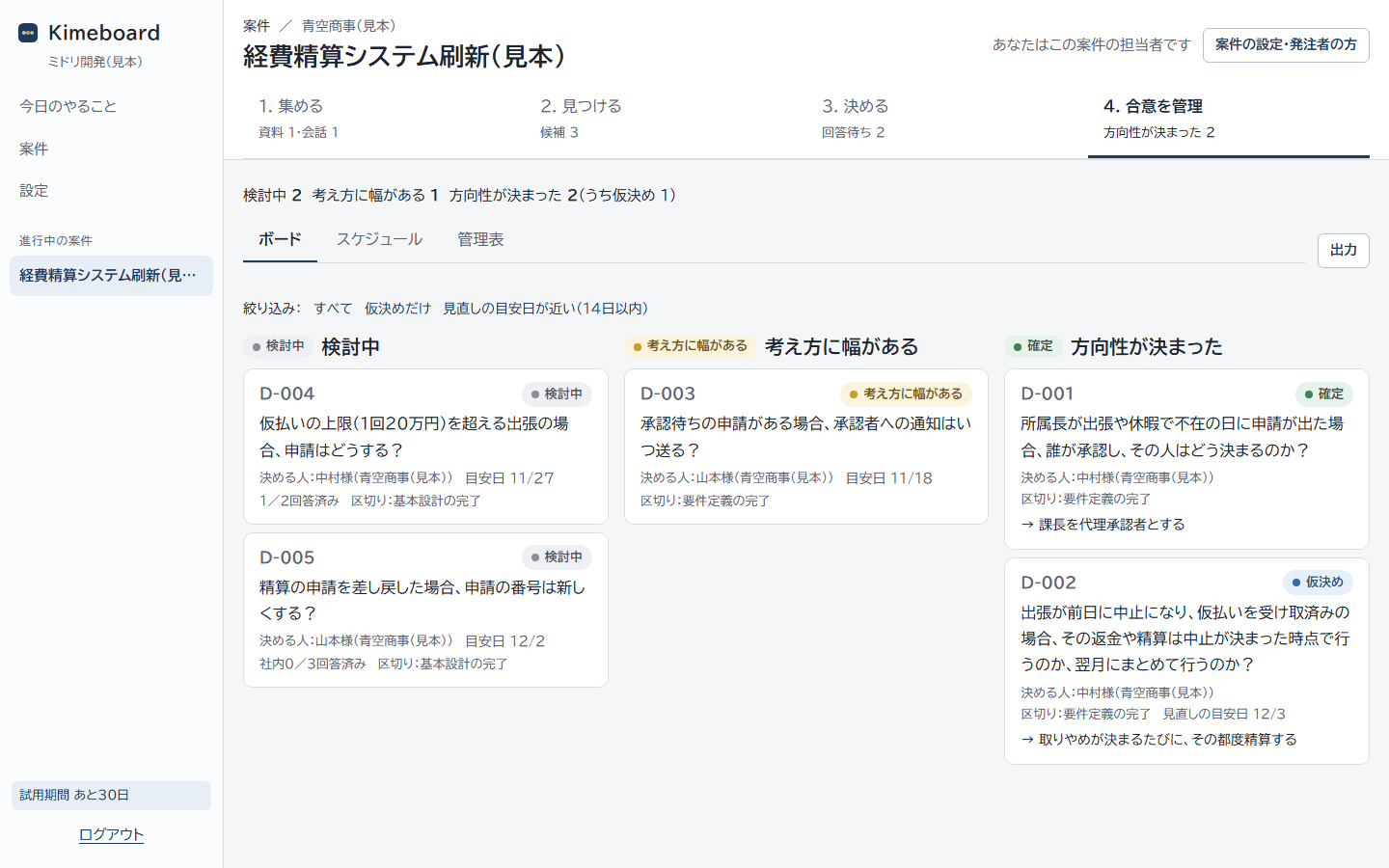
Why misunderstandings happen
Same document, different pictures in each person's head.
Even a written requirements document has sentences that can be read two ways, and items left as "to be defined separately." A remark in a meeting like "I think that should be fine" gets treated as a decision without the person ever confirming it. The difference only surfaces in acceptance testing. And when changes come up, no one can trace what was decided, where, so the discussion goes in circles.
- 9:00
No one can tell whether "Requirements_v3.xlsx" or "v3_revised.xlsx" is the latest, so the team goes by the email dates.
- 10:00
The spec says "Expenses are settled after the trip is completed." The vendor reads it as "a canceled trip is not completed." The client assumes "a canceled trip counts as completed." Each side thinks the other agrees.
- 13:00
In the weekly meeting, the client's contact says, "Settling next month is probably fine. I'll check with my manager." The minutes say "settle next month (tentative)," and no one follows up.
- 3 months later
In acceptance testing, the manager says, "Our rule is same-day settlement." Is it a rework or extra work? The two sides can't agree.
Open points slip through unnoticed
"As appropriate." "To be defined separately." A sentence that reads two ways. The later these are found, the bigger the rework.
"Probably this" becomes a decision
A remark that sounds like a direction gets treated as final, without checking with the person who decides.
No one can trace how things changed
Who agreed to what, and when? Later requests can't be laid side by side with the original agreement.
How it works
Four steps from open question to decision on record.
The vendor's team just adds the documents to get started. Clients simply answer from the link in their email. It works for solo projects too.
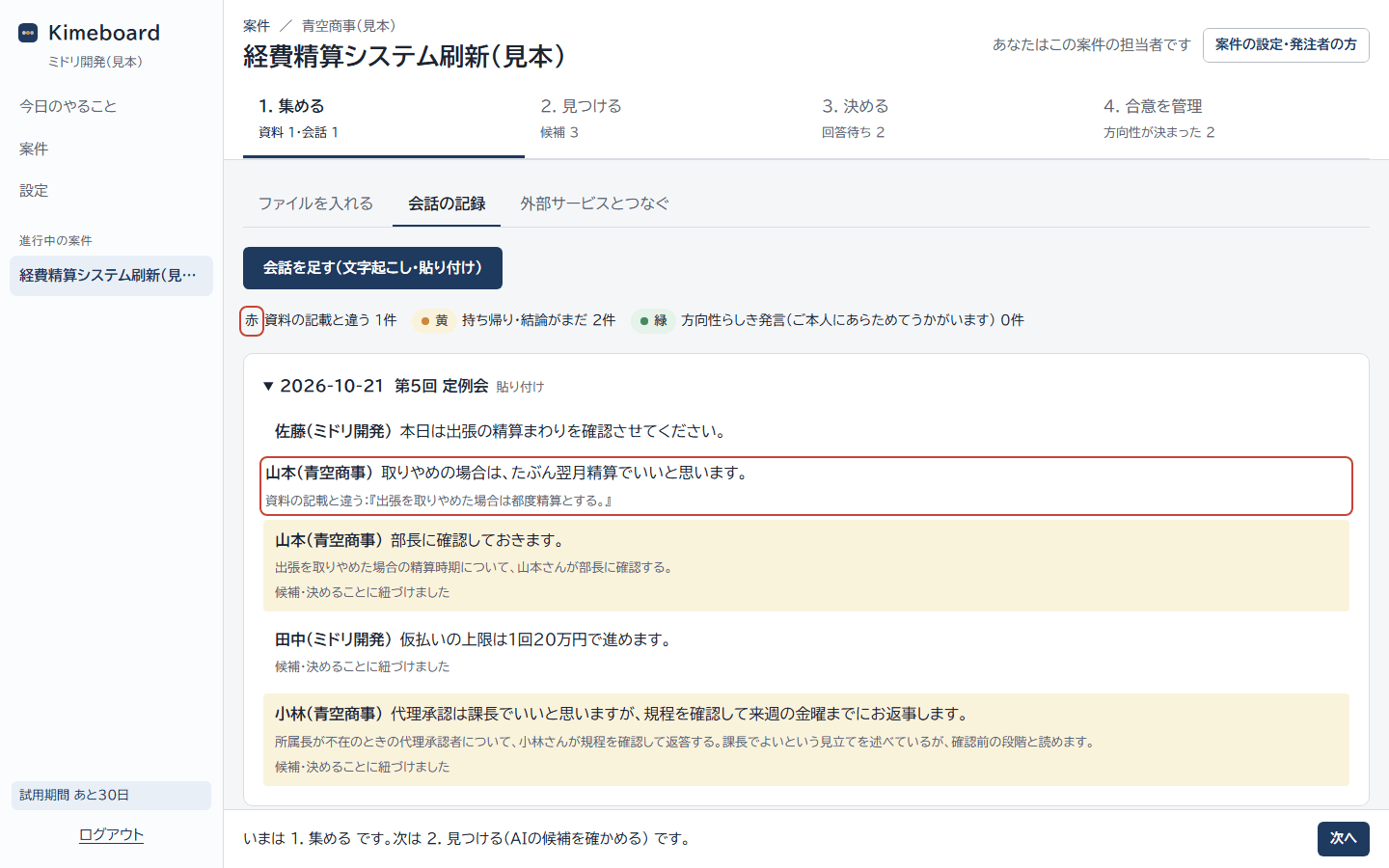
1Step 1
Collect: add documents and meeting records
Add requirements, design documents, minutes, Q&A lists, and meeting transcripts. Kimeboard recognizes newer versions of the same document and sets older ones aside. In conversations, it color-codes remarks that differ from the documents, action items, and remarks that sound like a direction. Action items go into the registers automatically.
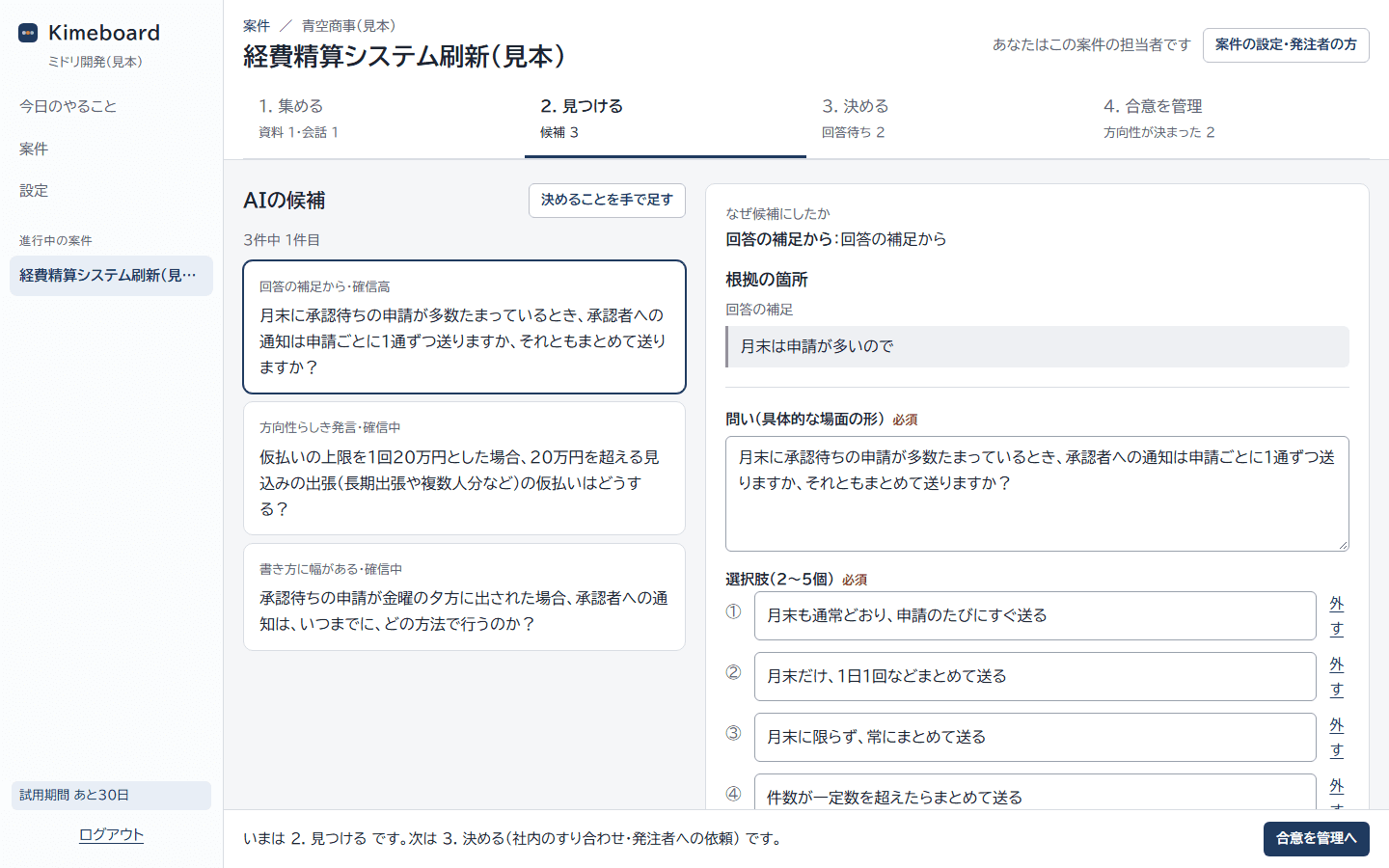
2Step 2
Find: AI lists open decisions, with sources
It flags places where the documents say two things, say nothing, or leave room for interpretation, quoting the exact sentence from the source. Candidates whose quote doesn't match the source word for word are never shown. The vendor's team decides whether to ask the client.
3Step 3
Decide: ask the person who decides, with the source attached
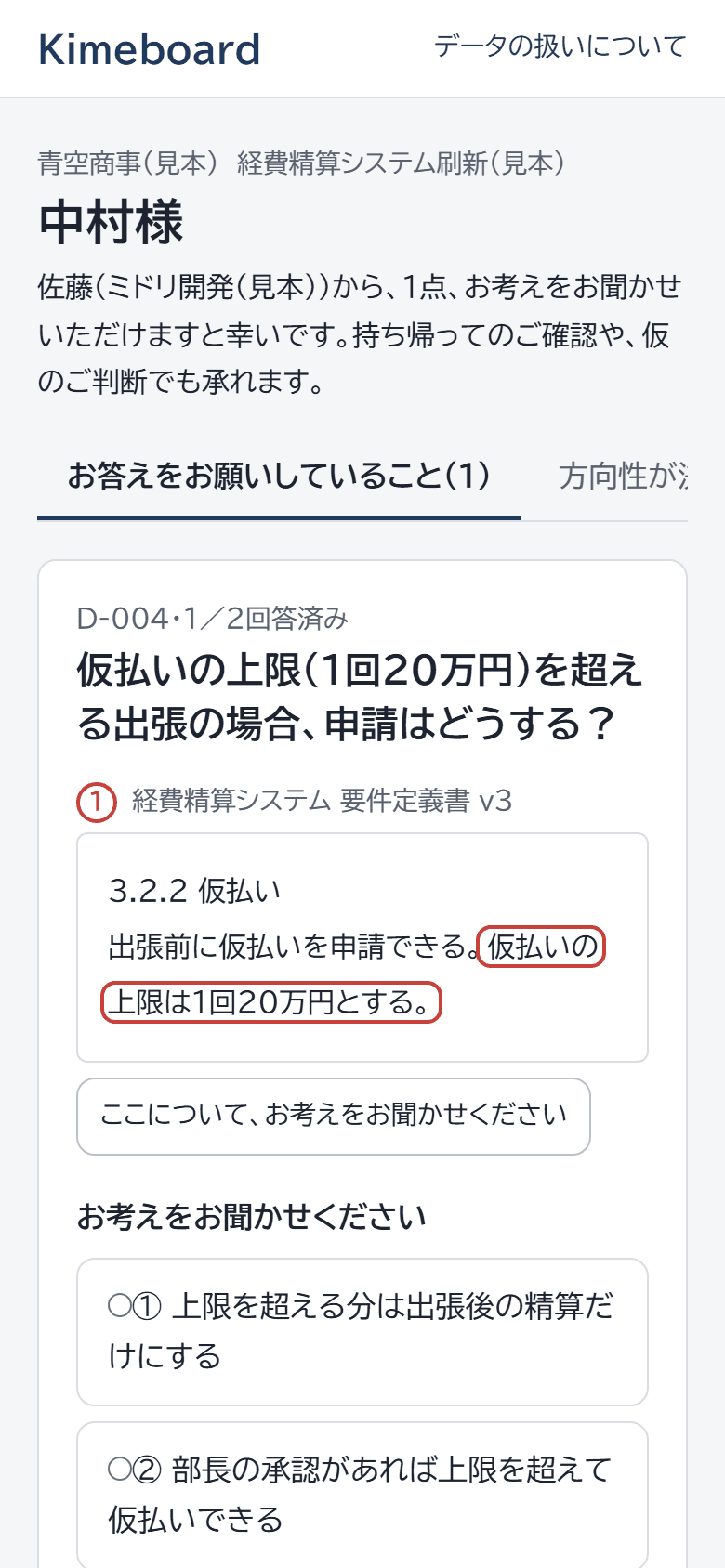
Clients don't need an account. From the email link, they read the relevant passage and choose an answer. When you ask several people, such as the contact and the approver, no one sees the others' answers until everyone has replied, so differing views come to light. "I need to check and get back to you" and "Go with this for now (can revisit later)" are valid answers too.
4Step 4
Track agreements: see Final, Provisional, and open items at a glance
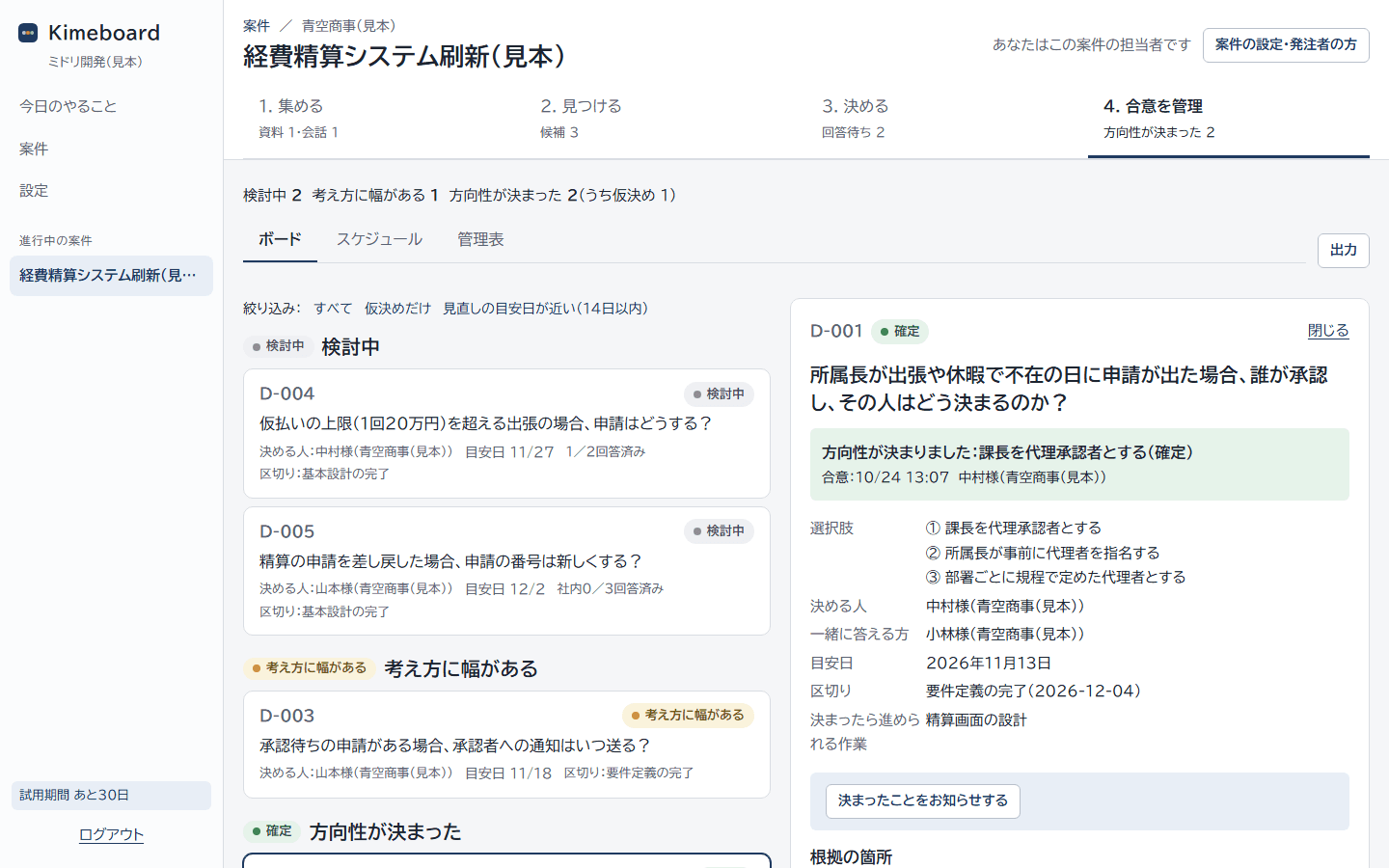
Decisions are arranged as Under discussion, Views differ, and Settled. Kimeboard never sends automatic reminder emails when a target date passes. Your team reviews the message and sends any follow-up themselves.
Change management
Line up later requests against the original agreement.
Requests that come in after a decision is settled are handled as change requests. Kimeboard shows them next to the record of who answered what and when, asks the person who decides, and, if the direction changes, saves a new agreement as the next version. The previous agreement is never deleted.
- Agreements are kept as a record that can't be rewrittenAnswers and agreements are append-only. The record shows who decided, when, and how (Final or Provisional).
- Every provisional decision has a target date and a point to revisit"Go with this for now" never gets forgotten. When the target date arrives, it appears in your team's to-do list.
- Revisions are kept as versionsThe acceptance test checklist also shows the version, e.g. "Changed by change request (date)."
Just two parties
Vendor and client work from the same record.
Software vendor (the team building it)
Ask what needs asking, with sources
Pick what to ask the client from the AI candidates, review the request message, and send. Once the answers are in, the agreement is recorded, and you can export the acceptance test checklist and registers to Excel. Only the vendor's team can see each person's answer.
Client (the one commissioning it, free)
No account needed, easy to answer
All it takes is the email link and a 6-digit code sent to the person. They choose while viewing the relevant passage, and can also take an item back to check or make a provisional decision. The list of decisions and the status of change requests are always available.
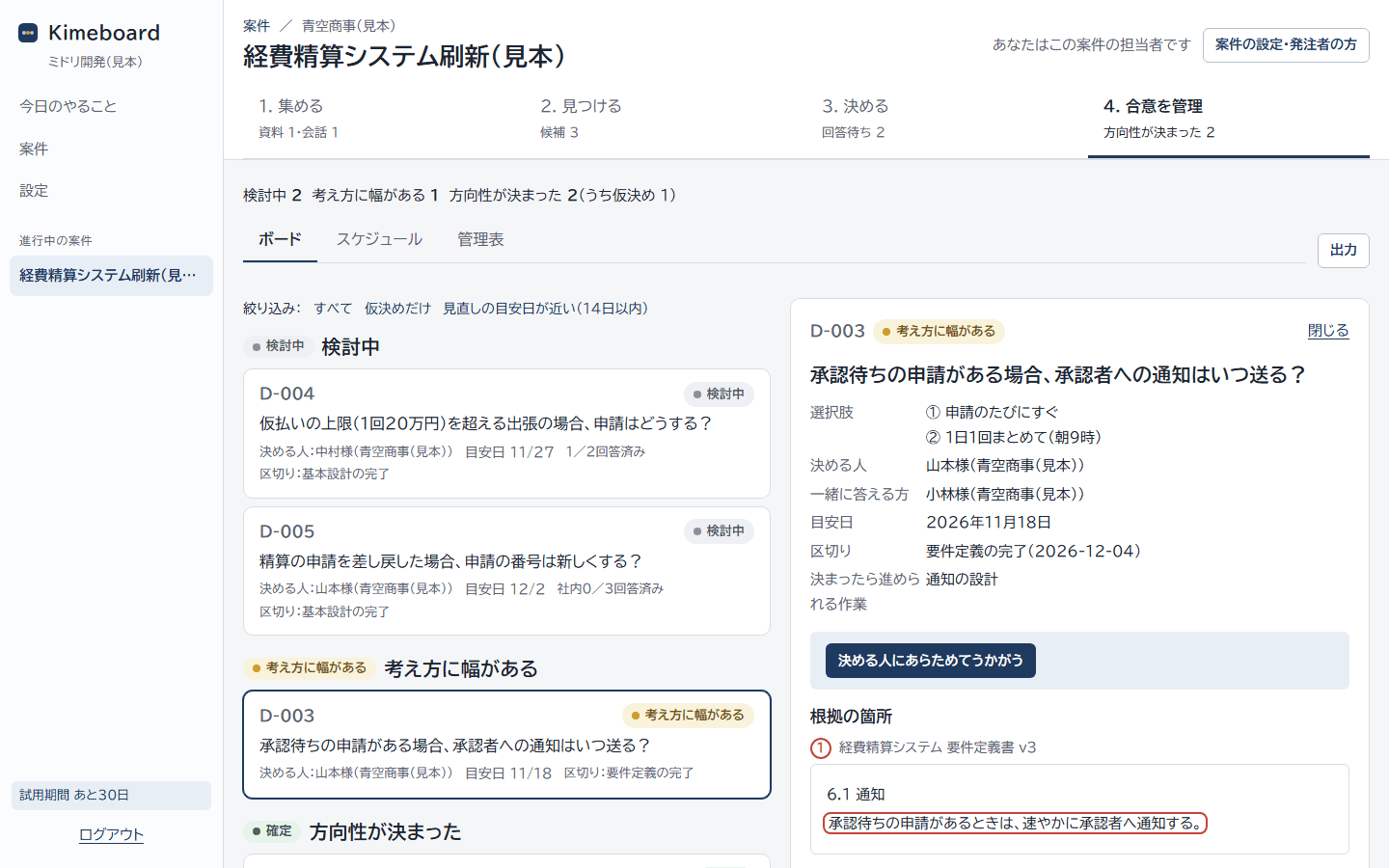
When the client's contact and approver see things differently, the vendor's team can see who answered what. The client side is told only "There were two different views," without names.
What you get
Settled decisions turn into an acceptance test checklist and registers automatically.
Only settled decisions are used, so open items never slip into testing. Export to Excel and adapt it to the format you already use.
Acceptance test checklist (Excel)
Scenario, expected result, basis (date and person who agreed), and Final or Provisional. Items still under discussion go on a separate sheet.
| No. | Scenario | Expected result | Basis | Final / Provisional |
|---|---|---|---|---|
| AT-001 | An expense claim arrives on a day the department head is away on a business trip | The section manager approves as deputy | D-001 v1, agreed 10/24, Mr. Nakamura | Final |
| AT-002 | A traveler who has already received an advance cancels the trip | Settle each time a cancellation is confirmed | D-002 v1, agreed 10/24, Mr. Nakamura | Provisional (review 12/3) |
Registers: action items, issues, and risks (Excel)
"I'll take that back" in a meeting and "I need to check and get back to you" in an answer are logged automatically. Issues and risks are logged after the vendor's team reviews them.
| No. | Logged | Status | Meeting | Description | Owner |
|---|---|---|---|---|---|
| H-001 | 10/21 | Open | Weekly meeting #5 | Check with the manager how to settle expenses for canceled trips | Yamamoto (Aozora Trading) |
| H-002 | 10/21 | Open | Weekly meeting #5 | Check the company rules on whether the section manager acts as deputy approver, and reply | Kobayashi (Aozora Trading) |
You can also export a decision record (Excel) summarizing each agreement and its history, and a full export (JSON). The decision record documents agreements; it is not a contract. Company and person names shown are samples.
Try the flow, no sign-up
In a sample project, adopt a candidate, answer as the client, and see an agreement form, all in about 3 minutes.
Pricing
Just pick a term for each project.
Choose 3, 6, or 12 months to match the length of your project. One-time payment, no automatic renewal. Free for any number of clients.
3 months
US$399
US$133 per month equivalent
6 months
US$669
US$112 per month equivalent
For projects from requirements through acceptance
12 months
US$1,199
US$100 per month equivalent
- Try 1 project free for 30 days (no card required)
- Up to 10 vendor-side users per project (works solo too)
- Any number of clients and stakeholders, free and with no account
- Buy more time before your term ends, and it extends from there
- After the term ends, you can still view and export your records
- If a decision-maker's answer isn't recorded because of a fault on our side, we refund that month's share of the fee
For clients
Free, no account, easy to answer.
- No account needed. Open it with the email link and a 6-digit code sent to you
- Just choose from the options while viewing the relevant passage
- "I need to check and get back to you," "Someone else should decide," and "Go with this for now" are valid answers too
- You can extend target dates yourself. The system never sends automatic emails pressing you to answer
- Other people's individual answers are not shown to you
FAQ
Can the AI make decisions on its own?
No. The AI only suggests candidate open decisions, with quotes from your documents. The vendor's team decides whether to ask, and agreements are created only from the answers of the person on the client side who decides.
Does it work for small projects I handle on my own?
Yes. It works with a single person on the vendor side and a single contact on the client side. You don't need a dedicated PM or admin. Just add documents, ask, and keep the record.
Do clients need to create an account?
No. It's free for clients, who open it with the email link and a 6-digit code sent to their email.
Is it safe to upload my client's documents?
Data is stored separately for each project, and only project participants can see it. We pass data to our AI provider on terms that it is not used for training, and documents are stored on servers in Japan. When you create a project, we ask you to confirm that your confidentiality agreement with the client allows storage in external services.
Will this duplicate my Backlog, Jira, or Excel registers?
Kimeboard only holds decisions. Keep managing issues in your current tools, and export registers to Excel to fit your existing format.
What kinds of documents can it read?
PDF, Word, Excel, PowerPoint, plain text, and meeting transcripts (exports from Notta, Zoom, Teams, and Google Meet, plus .vtt and .srt).
What happens when my term ends?
You can still view and export your records. To send new requests or add documents, buy more time. Answers to requests already in progress are not affected.
Is it available in English?
Yes. The service is available in English. Overseas customers must be businesses; we serve business customers only (B2B).
Try it from requirements on your next project.
Try 1 project free for 30 days. There is no cost to your clients. We're also happy to walk you through it online.
Request a walkthrough or contact us
We'll reply by email within 2 business days.